CaseDocker
Call +1 943 270 2421
  • Home
    • Platform Tour
    • Billing
    • Contract Management
    • Bid Management
    • Case Management
    • Compliance Management
    • Notice Management
    • Credit WorkDesk
    • KYC & Verification APIs
    • Consent Management
    • Document eSigner
      • Real Estate
      • Banking & NBFC
      • Insurance
      • Human Resources
      • Healthcare & Pharma
      • Legal Services
      • Logistics & Transport
      • Education
      • Manufacturing
      • Government & PSU
    • Instant E-Stamp Paper
    • Playbooks
    • Caseica
    • Law Firms
    • Banking & Finance
    • DSA & Finance Providers
    • Insurance
    • Manufacturing
    • Healthcare & Pharma
    • Technology
    • Real Estate
    • Energy & Utilities
    • Retail & E-commerce
    • Government & PSUs
    • Education
    • Media & Entertainment
    • Logistics & Transport
    • Hospitality
    • Blog
    • Legal Notice Formats
    • Contract Templates
    • Clause Library
    • Free Legal Tools
    • Software Buyer's Guides
    • Legal Guides
    • Court Case Status Guides
    • DRT Benches & Court Fees
    • Book a demo
    • Watch demos
    • Newsletter
    • Downloads
    • Whitepapers
    • Case Studies
    • How To
  • Contact Us
  • Login
For teams that need to record and prove consent

Consent Management

Record, manage, and prove consent in one place. Versioned notices, consent capture by link, kiosk, or staff, one-click withdrawal, and a tamper-evident ledger, built for India’s DPDP Act with a global baseline.

  • +Keep versioned notices and capture consent by link, kiosk, or staff.
  • +Let people withdraw as easily as they agreed, on the same record.
  • +Show what was agreed with a tamper-evident ledger and evidence packs.
Book a Free Demo Talk to us: +1 943 270 2421

30-minute live walkthrough. Your actual questions. No generic sales deck.

Partners in our journey
Georgia Tech logoGeorgia Tech
Microsoft logoMicrosoft
Tata logoTata
Spark Minda logoSpark Minda
Zee logoZee
TVS logoTVS
Renaissance Law College logoRenaissance Law College
Bajaj logoBajaj
Georgia Tech logoGeorgia Tech
Microsoft logoMicrosoft
Tata logoTata
Spark Minda logoSpark Minda
Zee logoZee
TVS logoTVS
Renaissance Law College logoRenaissance Law College
Bajaj logoBajaj
  • Georgia Tech
  • Microsoft
  • Tata
  • Spark Minda
  • Zee
  • TVS
  • Renaissance Law College
  • Bajaj
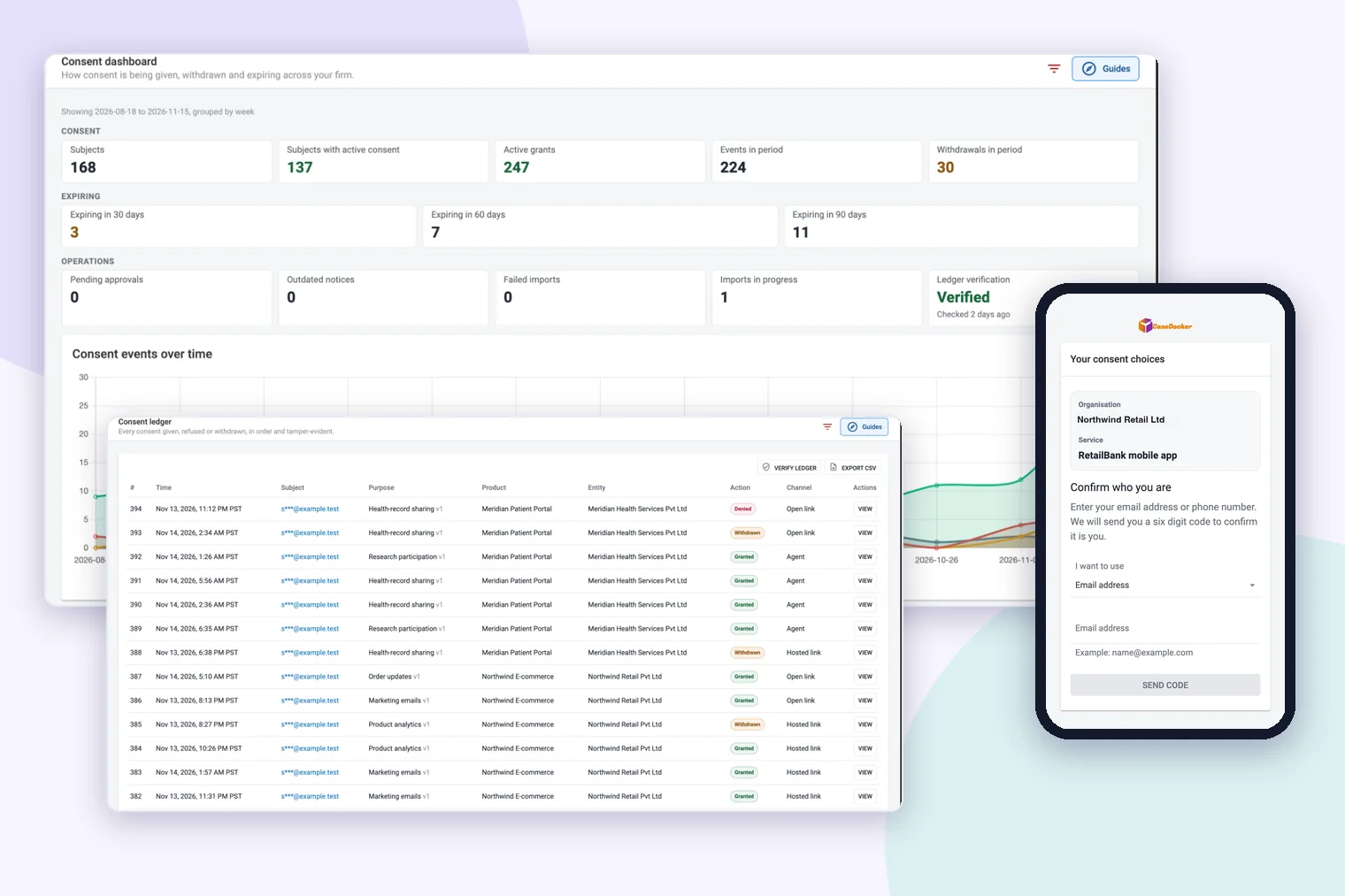
Consent Management dashboard inside CaseDocker

Why teams book the demo

See exactly how Consent Management fits your process.

1 ledgerEvery grant and withdrawal on record
VersionedExact notice text kept for each consent
DPDP-readyIndia rule pack with a global baseline
ISO/IEC 27001:2022 aligned operations
Built for legal and compliance teams
Live Q&A with your team’s use case
Why it matters

Consent is easy to collect and hard to prove

When consent lives in emails, spreadsheets, and form tools, answering "who agreed to what, and when?" turns into a search through scattered files.

  • 01

    Which notice did they see?

    Notices change over time. Without versions, you cannot show the exact wording a person agreed to.

  • 02

    Withdrawal gets lost

    A person who changes their mind should be as easy to record as one who agrees, in the same place.

  • 03

    Records anyone can edit

    A spreadsheet row can be changed or deleted quietly. A record you rely on should show if it was touched.

What you get

Everything to record and prove consent

Real screens from the module, from the firm-wide dashboard down to the single record behind each consent.

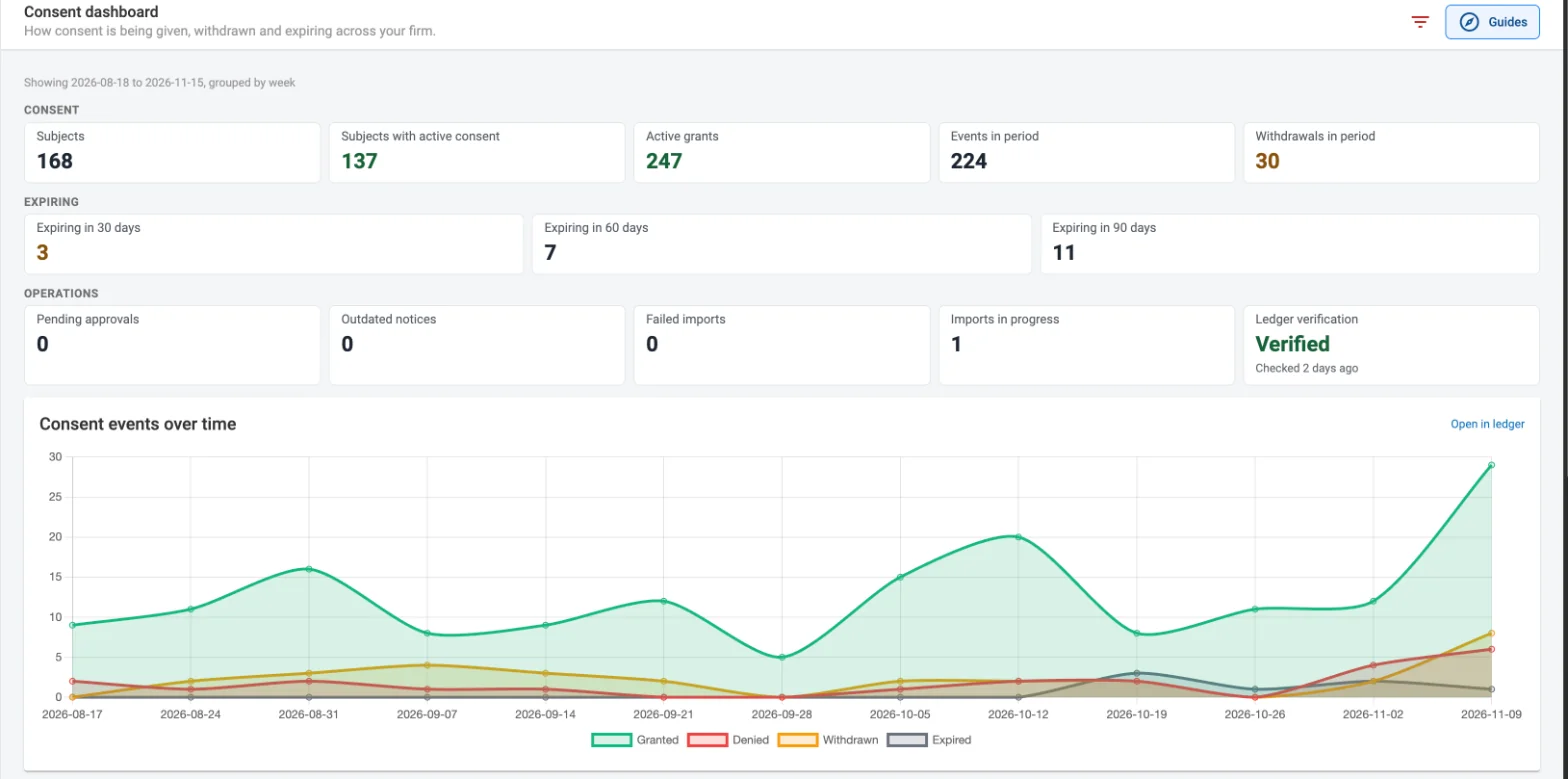
See consent across the firm

A dashboard of how consent is being given, withdrawn, and expiring, with charts over time.

  • Active grants, withdrawals, and events in the period
  • Consents expiring in 30, 60, and 90 days
  • Ledger verification status at a glance
Consent dashboard with counts of subjects, active grants and withdrawals, expiring consents, ledger verification status and a chart of consent events over time

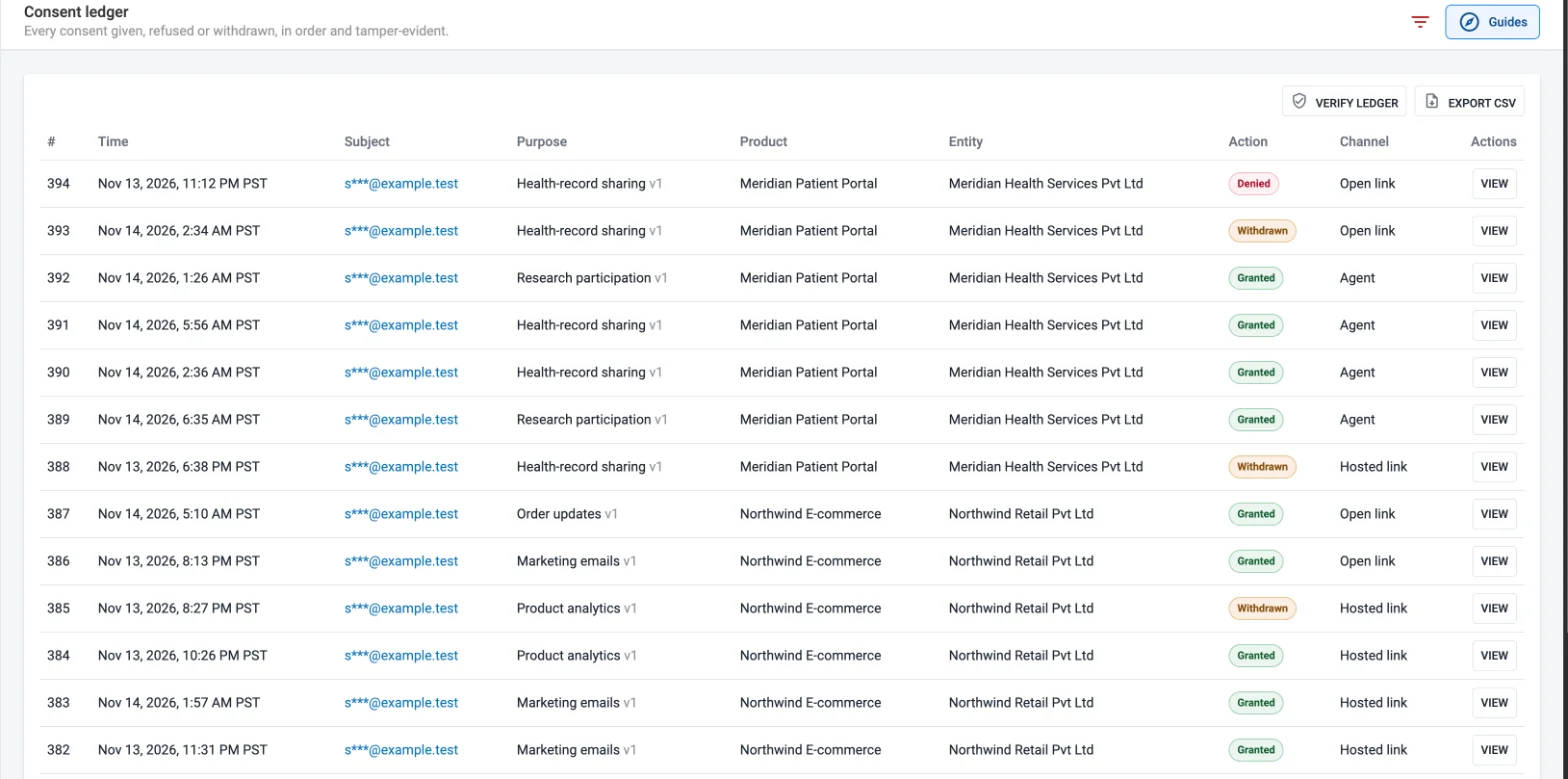
One ledger of every grant, refusal, and withdrawal

Every event is recorded in order, with readable local times and identifiers masked by default.

  • Filter by purpose, product, action, channel, and date
  • See the entity and product behind each record
  • Export the filtered set to CSV, and verify the ledger whenever you need to
Consent ledger table with time, masked email subject, purpose, product, entity, action and channel columns

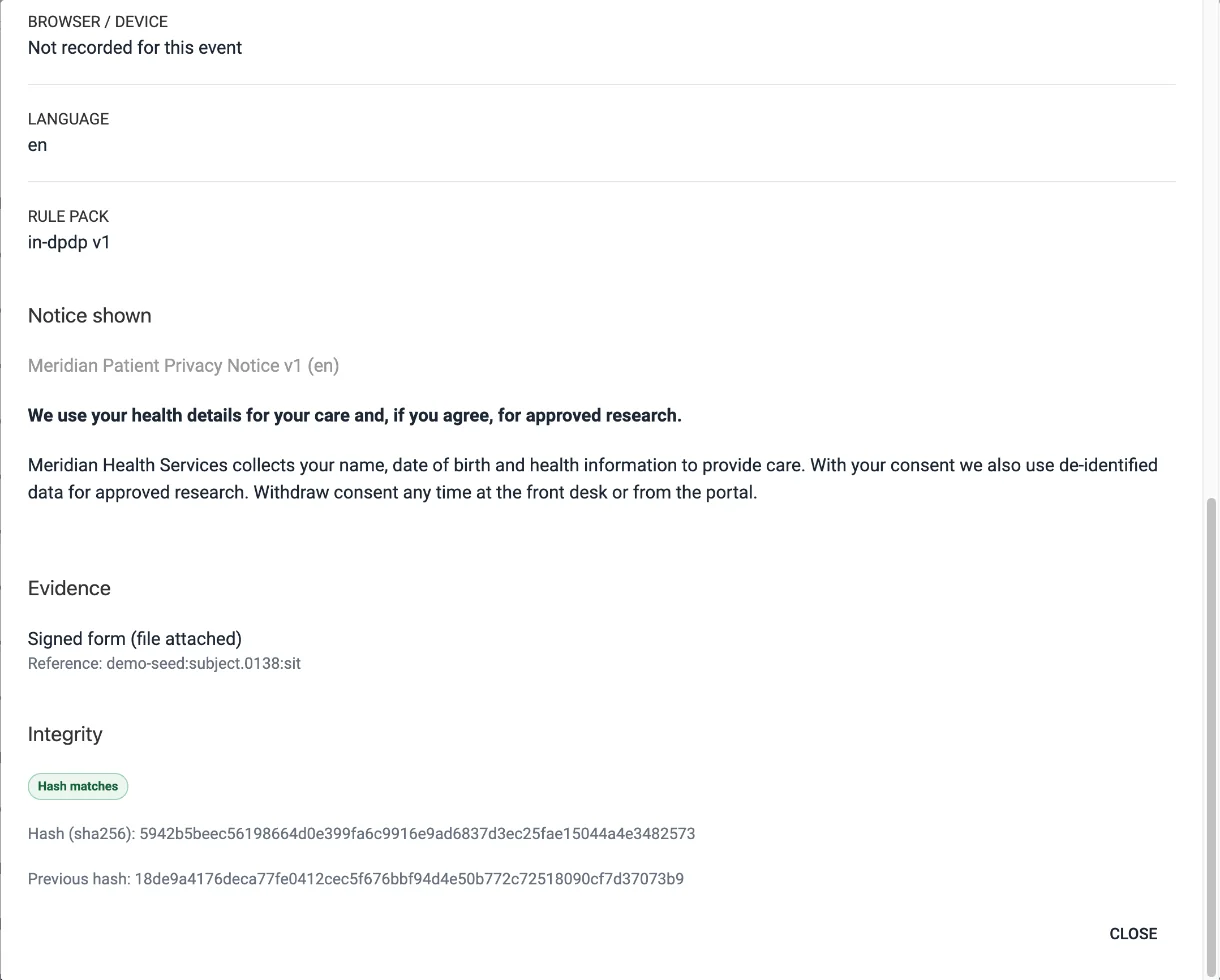
Open any record to see what the person saw

Each record keeps the exact notice text, the evidence, and its place in the hash chain.

  • The notice version shown, word for word
  • Evidence such as a signed form or a one-time-code confirmation
  • Hash check against the previous entry, with daily signed digests
Consent record detail showing the notice shown to the person, signed-form evidence, and an integrity check reading Hash matches with the entry hash and previous hash

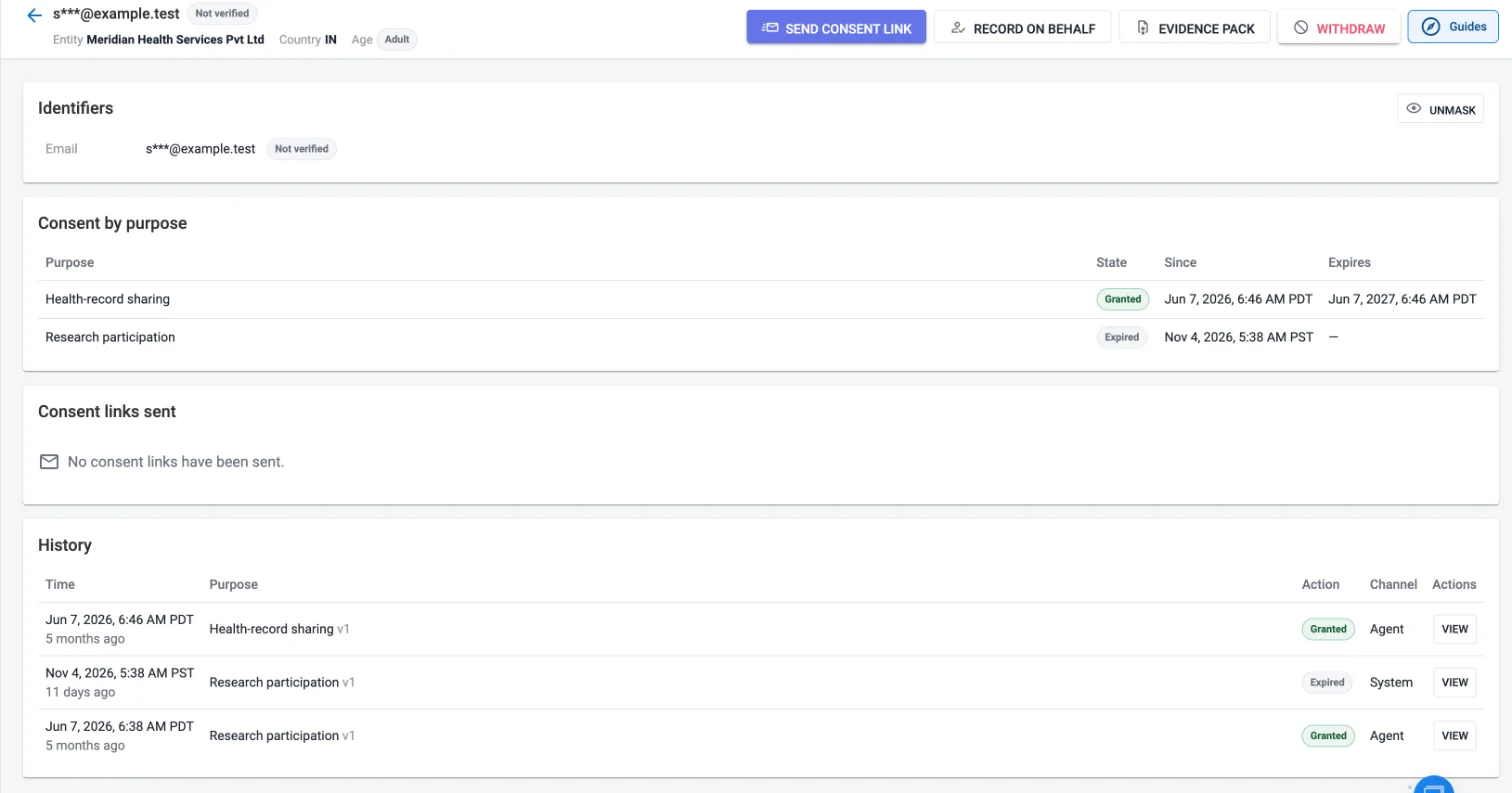
A complete profile for every person

The current state for each purpose and the full history, with the actions your team needs.

  • Send a consent link or record on behalf with evidence
  • Withdraw consent, or generate an evidence-pack PDF
  • Unmasking is restricted to permitted roles and logged
Subject profile with a masked email identifier, consent by purpose showing granted and expired states, and a history of events

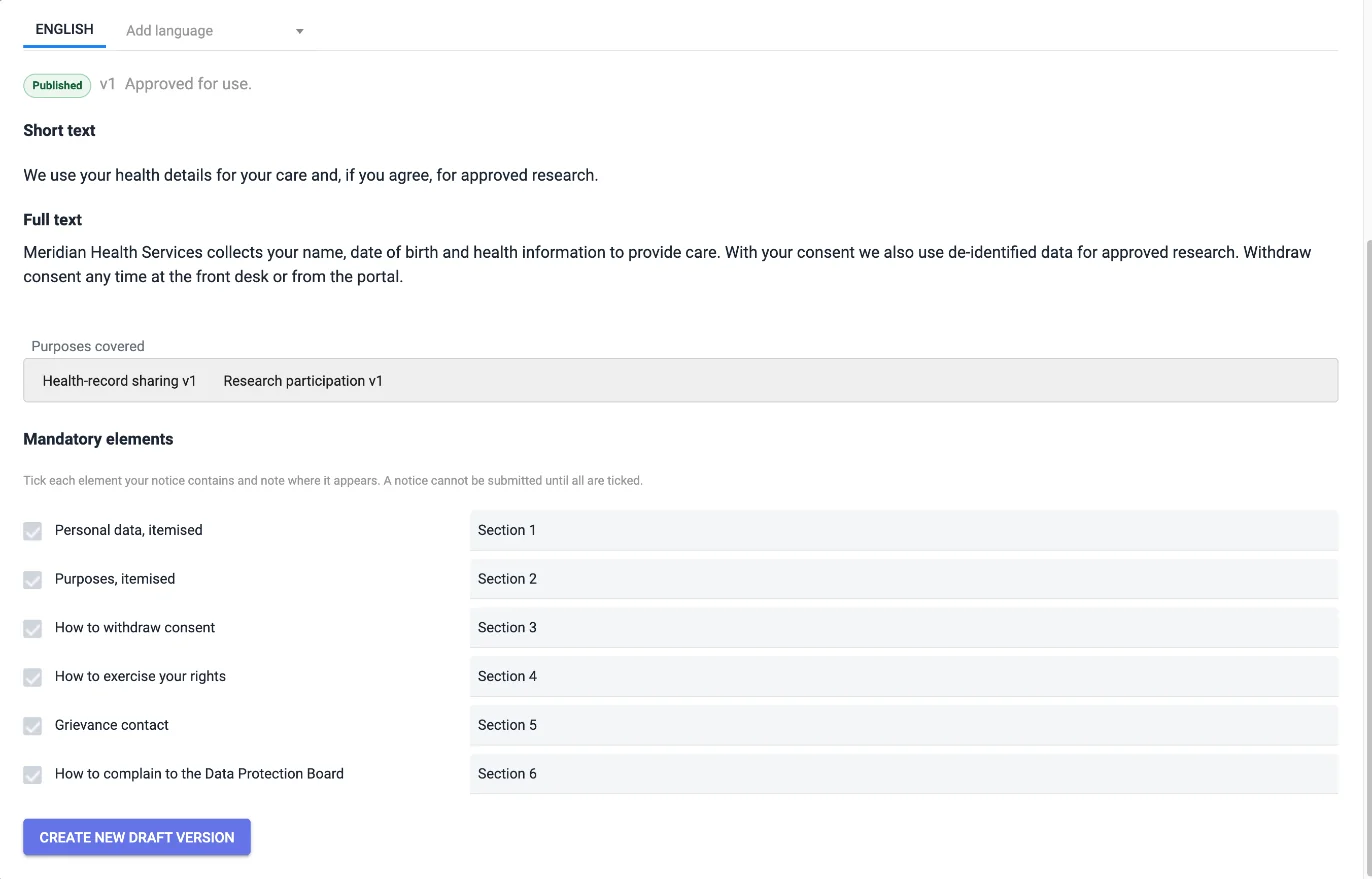
Notices checked before they go live

Each notice is ticked against the mandatory elements of the India DPDP or global baseline rule pack, with the section that covers each one.

  • Versioned notices, in more than one language
  • The purposes covered by each notice
  • A notice cannot be submitted until every element is covered
Notice editor showing a published version, the purposes covered, and the mandatory-elements checklist with every element ticked and mapped to a section

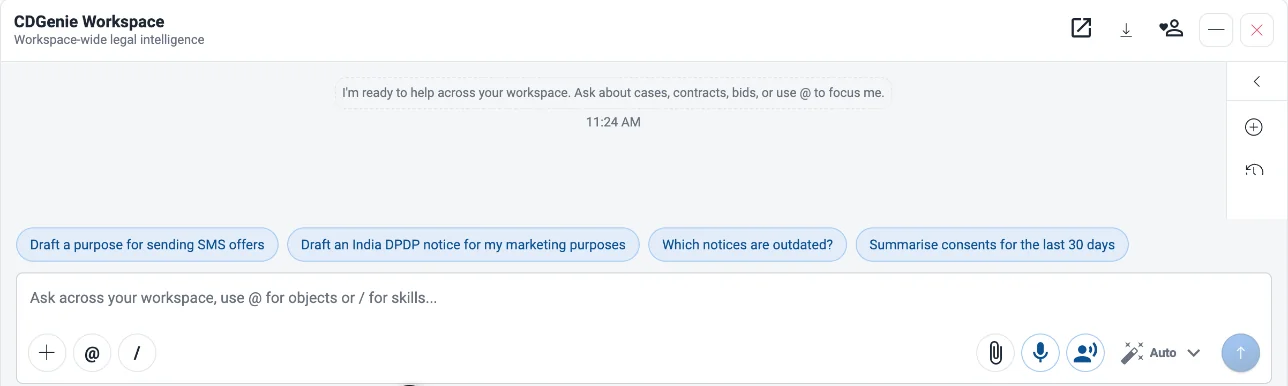
Draft with CDGenie, approve with people

CDGenie can draft purposes and notices and summarise consent for you. Drafts still need a second Privacy Officer’s approval, and CDGenie cannot approve a notice or record consent.

  • Suggestions such as drafting an India DPDP notice or summarising the last 30 days
  • Ask which notices are outdated
  • The two-person approval step stays with your team
CDGenie chat panel with suggested prompts: draft a purpose for sending SMS offers, draft an India DPDP notice, which notices are outdated, and summarise consents for the last 30 days

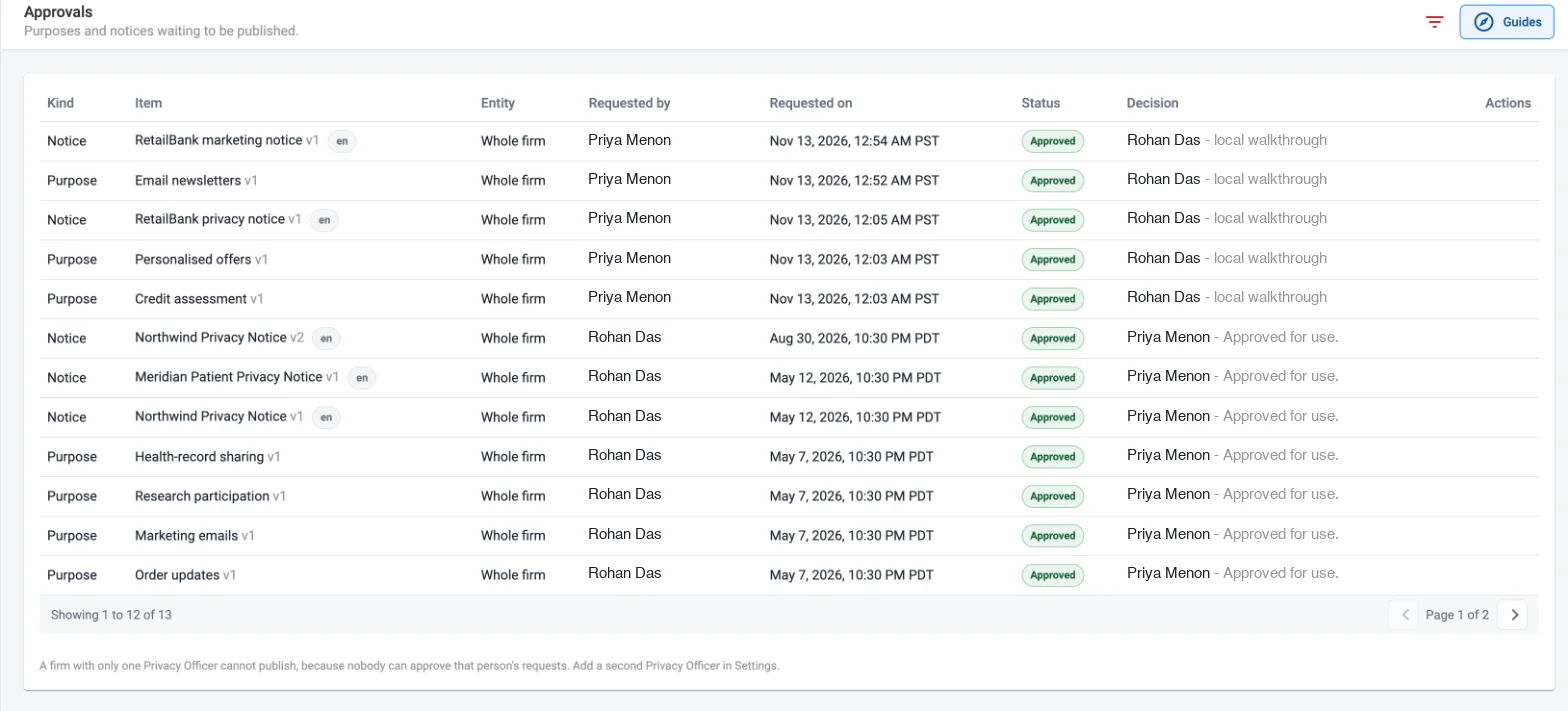
Two people to publish

Every purpose and notice is requested by one person and decided by another, and the approvals list keeps the record.

  • Pending and approved requests in one list
  • The requester is shown, and cannot approve their own request
  • Only approved versions are used for capture
Approvals list filtered to Approved, showing purposes and notices, who requested each, when, the status and the decision

What the person sees

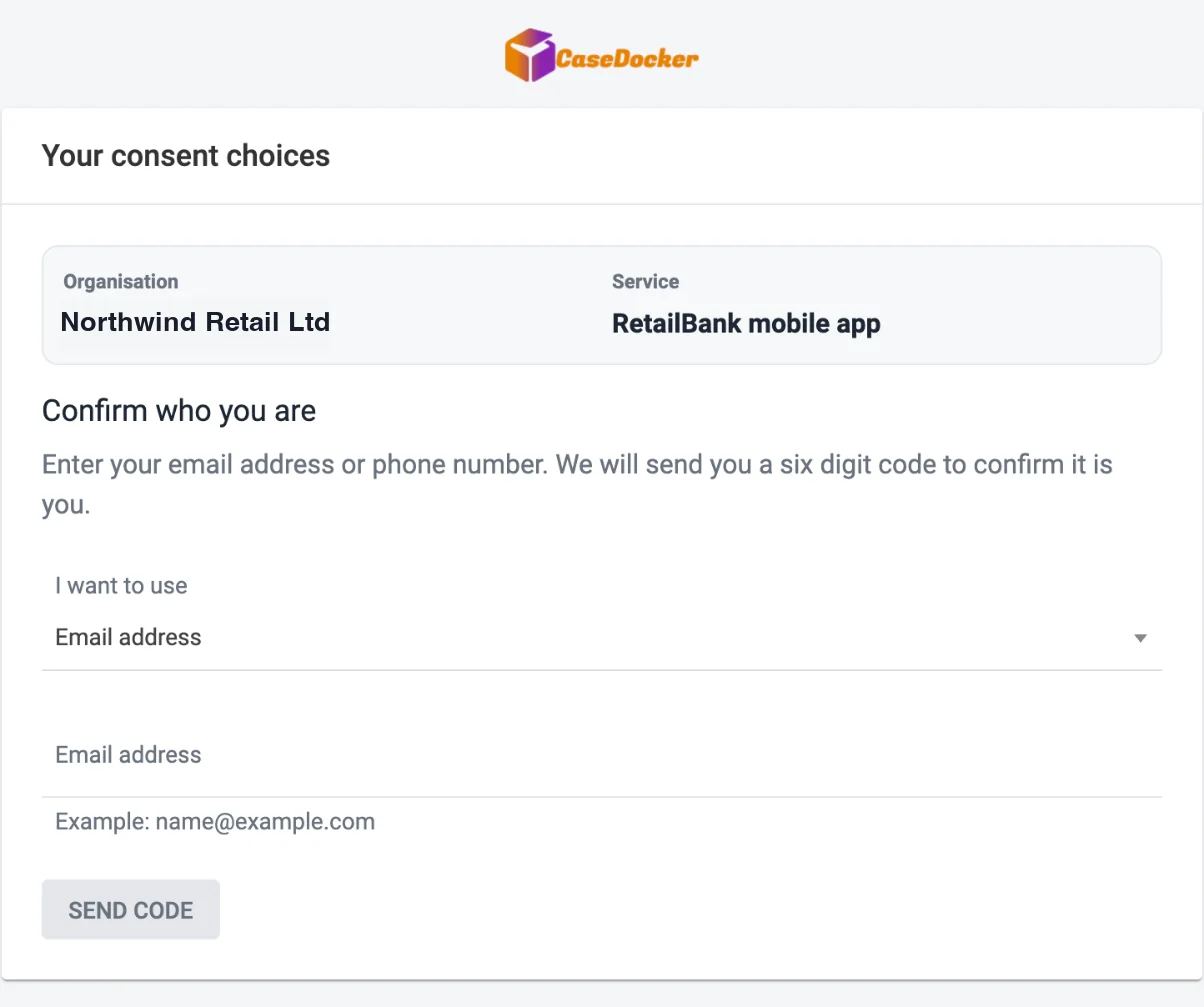
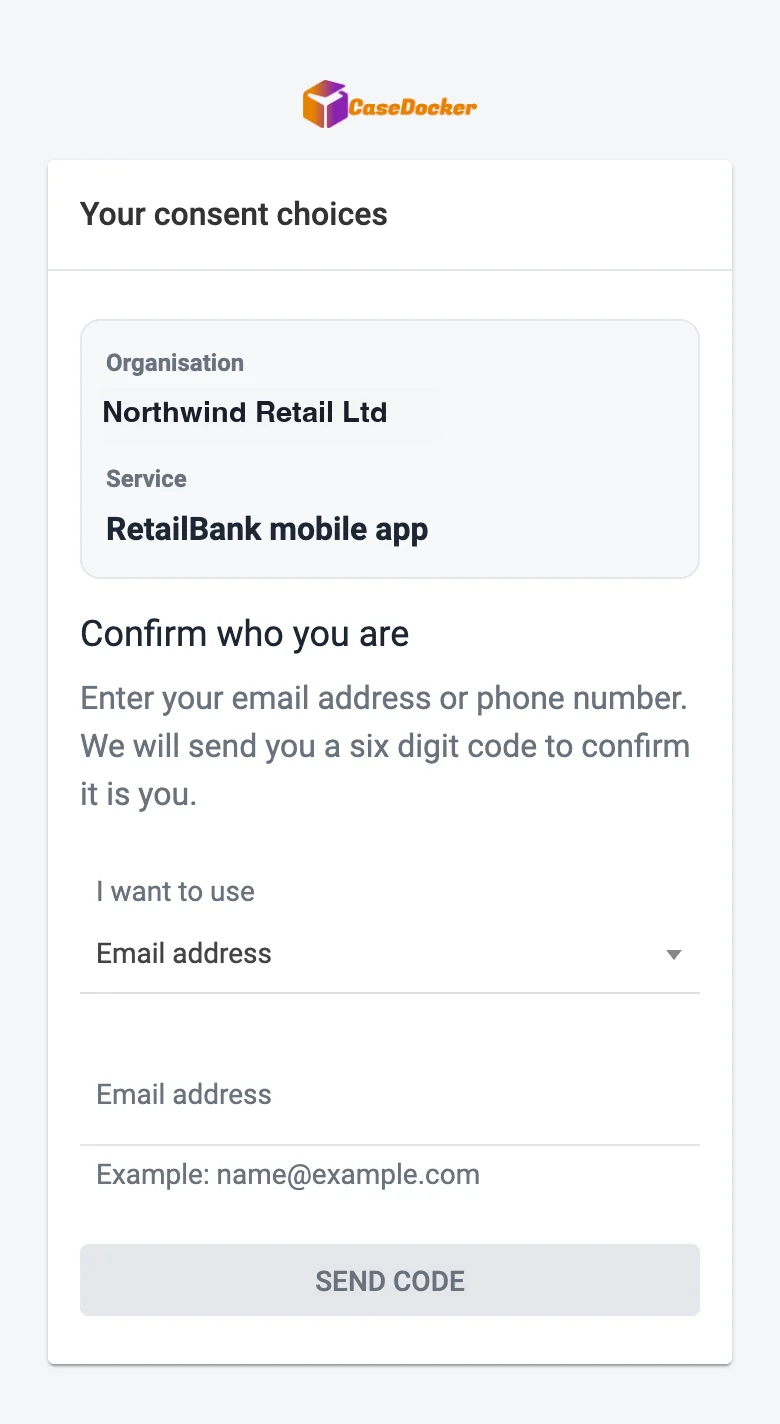
A simple page they can open on a phone or a desktop, confirm with a one-time code, and use to choose per purpose.

  • Nothing is pre-selected, and "Accept all" and "Reject all" are the same size.
  • The notice can be read in full before choosing, in the languages you publish.
  • A receipt lists the choices and links to one-click withdrawal.
  • Minors give an age declaration, and a guardian can be brought in.
  • Share an emailed link, an open link, or a kiosk.
Public consent page where the person confirms their email address or phone number with a six digit code, showing the organisation and service
The same public consent page on a phone
From notice to proof

How consent management works

A clear path from the notice you write to the record you can show later.

  1. Notice editor with the mandatory-element checklist
    01

    Define purposes and notices

    Set up what you ask consent for, and write the notice for each purpose. CDGenie can draft a first version for your team to review.

  2. Approvals list with a pending request
    02

    Approve and publish

    Check the notice against the rule pack, then have another Privacy Officer approve it. Only approved versions are used.

  3. Public consent page for confirming identity with a one-time code
    03

    Capture consent

    Send a link confirmed by a one-time code, share an open link, record on someone’s behalf with evidence, or import legacy consents.

  4. Consent ledger with grants, denials and withdrawals
    04

    Prove and withdraw

    Every grant and withdrawal lands in the ledger. Verify the chain and export an evidence pack whenever you need to show it.

Roles and security

The right access for each person on the team

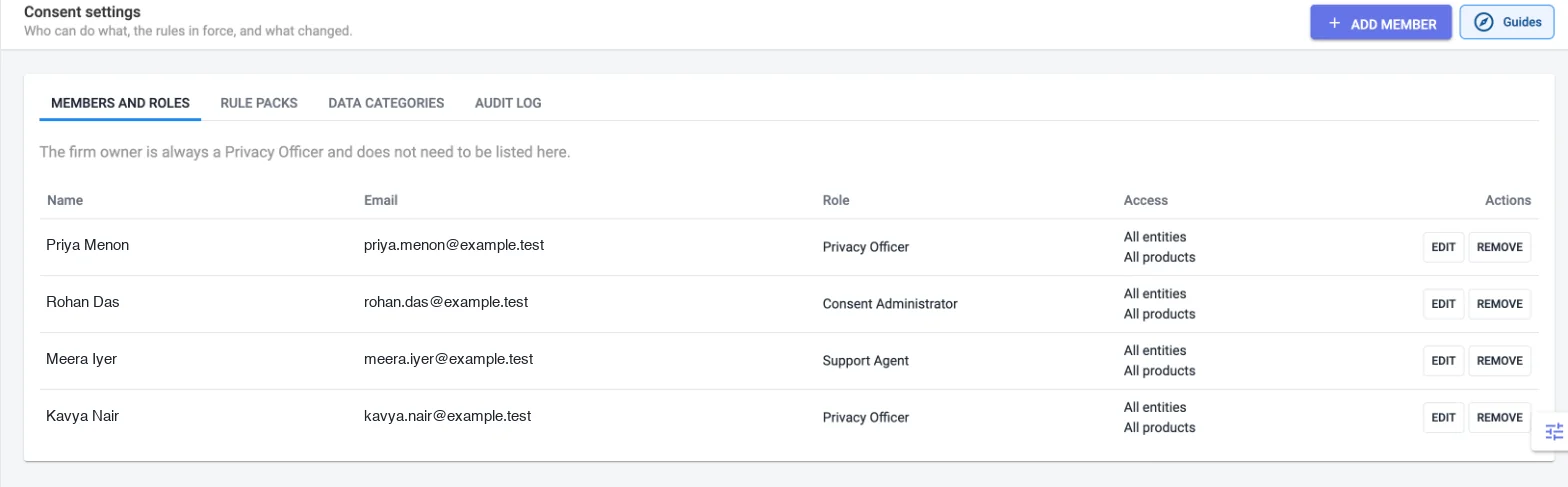
Four roles keep drafting, approving, recording, and auditing apart, with access limited to the entities and products each person handles.

  • Privacy Officer

    Approves and publishes notices, manages members, and can unmask identifiers, which is logged.

  • Consent Administrator

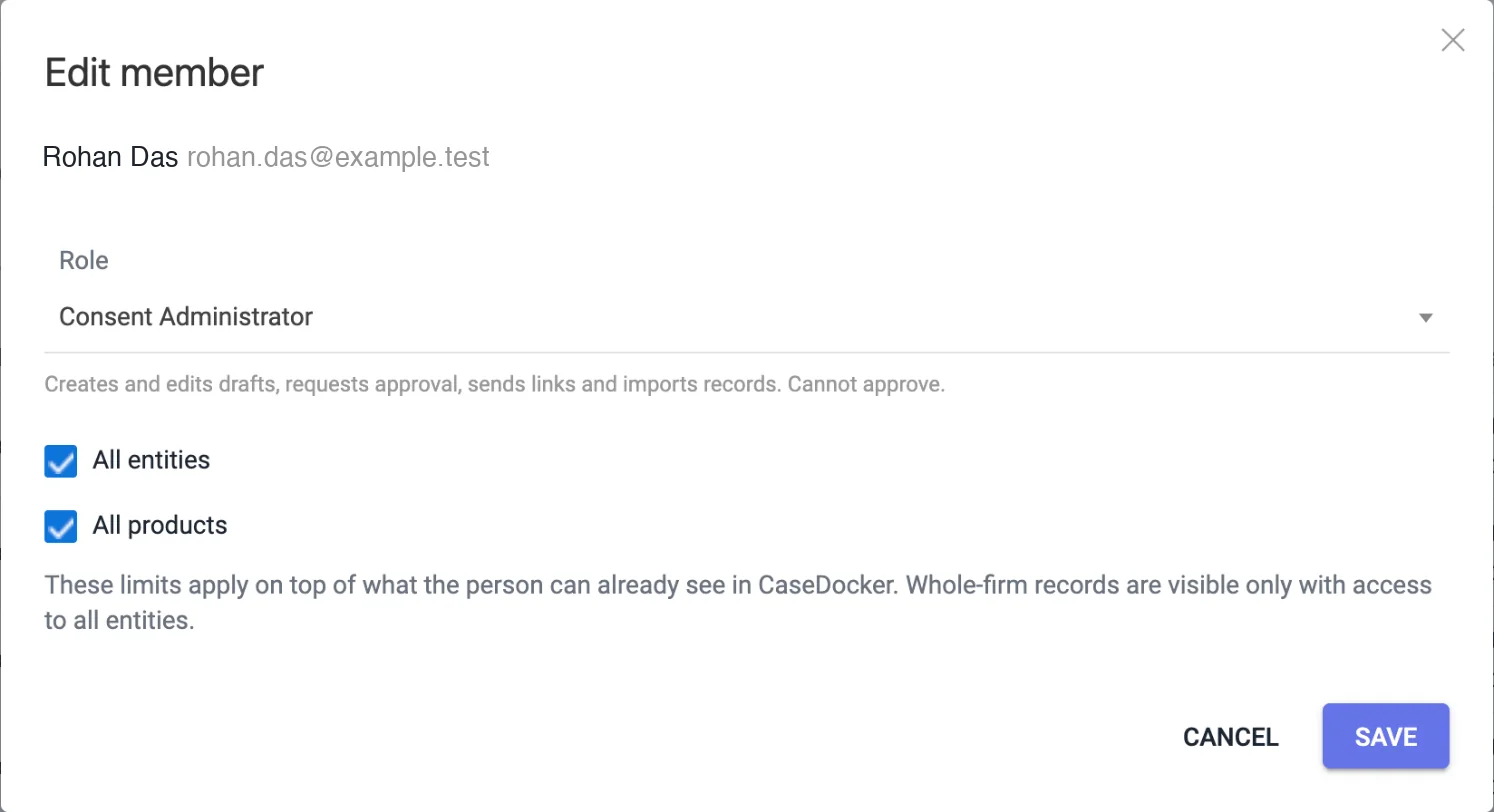
    Drafts purposes and notices, requests approval, sends links, and imports legacy consents. Cannot approve.

  • Support Agent

    Finds a person, sends a link, and records consent on their behalf with evidence. No export or unmasking.

  • Auditor

    Read-only access to the ledger, configuration, approvals, and audit log.

Settings page listing team members with their roles and access to all entities and all products
Edit member dialog with the Consent Administrator role and the All entities and All products limits
Masked identifiers with logged unmaskingAppend-only, hash-chained ledgerScoped by entity and product

What is Consent Management?

Consent Management in CaseDocker is a module that helps legal, privacy, compliance, and customer-facing teams record, manage, and prove consent. It keeps a registry of purposes and versioned notices with two-person publishing, captures consent through emailed links confirmed by a one-time code, open links and kiosks, staff recording with mandatory evidence, and bulk import of legacy consents, and lets people withdraw in one click. Every grant and withdrawal is written to an append-only, hash-chained ledger with daily signed digests, and evidence-pack PDFs show what was agreed and when. It starts with India's Digital Personal Data Protection Act, 2023 and the DPDP Rules, 2025, with a global baseline rule pack.

Real workflows

Publish a notice with a second pair of eyes

Draft a purpose and notice, check it against the mandatory-element checklist for the rule pack, and have the Privacy Officer approve it before it is used. CDGenie can draft a first version, and approval stays with your team.

Collect consent and keep the proof

Send an emailed link confirmed by a one-time code, share an open link or kiosk, or record consent on a person's behalf with evidence. Each grant or withdrawal is added to the ledger, and an evidence pack can be exported when someone asks.

Supported integrations

  • Bulk import of legacy consents from CSV or XLSX files
  • Consent capture inside CaseDocker KYC verification flows
  • Email delivery of consent links and receipts, with one-time-code confirmation
  • CaseDocker modules including KYC & Verification, compliance, and Document eSigner

Implementation prerequisites

  • A named Privacy Officer and the team members who will draft, record, and audit consent
  • The list of purposes you collect consent for and the notice wording for each, in the languages you need
  • Existing consent records in CSV or XLSX form if you want to import legacy consents

Limitations

  • Consent Management helps your team record and prove consent. Whether your processing meets the law remains a decision for your legal and privacy team.
  • Cookie banners and scanning, web and mobile SDKs, a consent-check API, a preference centre, data-subject rights requests, and webhooks are not part of the module today.
  • CaseDocker is not a registered Consent Manager under the DPDP Rules.
  • AI-assisted drafting supports your team and cannot approve a notice or record consent.

Security architecture

  • Four roles (Privacy Officer, Consent Administrator, Support Agent, Auditor) separate drafting, approving, recording, and auditing.
  • Access can be limited by entity (client business) and by product.
  • Identifiers are masked by default, and unmasking is restricted and logged.
  • The consent ledger is append-only and hash-chained, with daily signed digests and a verify action.

Data sources

  • Purposes, notice versions, and approvals created by your team
  • Consent grants and withdrawals captured through links, kiosks, staff recording, imports, and the KYC flow
  • Evidence supplied with each record, such as one-time-code confirmations, signed forms, and call-recording references

Customer examples

Privacy and compliance team

A privacy team keeps versioned notices, approves them through the Privacy Officer, and exports an evidence pack when asked what a person agreed to.

Customer support team

Support agents record consent or withdrawal on a customer's behalf with mandatory evidence, without being able to export records or unmask identifiers.

Frequently asked technical questions

It helps your team record, manage, and prove consent. You define purposes and versioned notices, capture consent through links, kiosks, staff recording, bulk import, or the KYC flow, let people withdraw in one click, and keep every event in a tamper-evident ledger with evidence-pack PDFs.

It includes a rule pack for the Digital Personal Data Protection Act, 2023 and the DPDP Rules, 2025, with a mandatory-element checklist for notices, plus a global baseline pack. It helps your team record and prove consent. It does not by itself make your organisation compliant. The substantive DPDP Rules commence on 13 May 2027.

Consent events go into an append-only ledger where each entry is hash-chained to the previous one. Daily signed digests and a verify action show whether any record was altered.

Yes. Withdrawal is one click for the person, and it is recorded in the same ledger as the original consent, so the current state and the history are both visible.

The flow asks for an age declaration and brings in a guardian where the person is a minor, so the guardian's consent is recorded.

Access follows four roles: Privacy Officer, Consent Administrator, Support Agent, and Auditor. Access can be limited by entity and by product, identifiers are masked by default, and unmasking is logged.

Cookie banners and scanning, web and mobile SDKs, a consent-check API, a preference centre, data-subject rights requests, and webhooks are not available today. CaseDocker is also not a registered Consent Manager.

Related reading

KYC & Verification APIs

See how consent can be captured as part of a verification flow.

Compliance Management

Connect consent records with obligations, due dates, and audit-ready compliance work.

Document eSigner

Explore eSigning and audit-ready execution alongside your consent records.

See Consent Management in CaseDocker

Bring your purposes, notices, and capture channels. CaseDocker will show how Consent Management can be set up for your team.

Book a Demo
Book a Demo

Schedule a Demo

Share a few details and our team will reach out to coordinate your walkthrough.

01

Tailored to your workflow

Tell us what you want to see and we will shape the walkthrough around your contract, case, compliance, or notice workflows.

02

Fast scheduling

Once you submit the form, our team will follow up to coordinate a convenient time.

Demo Request

Book Your Demo

Share your requirements
Pick a preferred slot (optional, IST)

All times are India Standard Time (IST). We'll confirm the exact time with you.

Still needed: name, work email, phone, message

Tell us your priorities and we will tailor the demo.

Ready to see it live?

30 minutes. Your actual documents. Your team's questions answered.

Book My Demo Or call us directly: +1 943 270 2421

Got 2 minutes? See CaseDocker live.

📞 Call Now Book Demo
📞 Book Demo
CaseDocker logo
Your Smart Legal Workdesk - Powered By Coingeit

  • Contract Lifecycle Management
  • Instant E-Stamp Paper
  • Case Management
  • Notice Management
  • Compliance Management

Calculators

  • Court Fee Calculator
  • Stamp Duty Calculator
  • Stamp Duty by State
  • DRT Court Fee Calculator
  • Limitation Period Calculator

Formats & guides

  • Contract Templates
  • Clause Library
  • Legal Notice Formats
  • Legal Guides
  • Court Case Status
  • DRT Case Status
  • Glossary
  • FAQ

  • About CaseDocker
  • Contract Lifecycle Management
  • Legal Case Management
  • Compliance Management
  • Notice Management

  • Industries
  • Integrations
  • Compare CaseDocker
  • Alternatives
  • US Resources
© 2026 Coingeit · An ISO/IEC 27001:2022 Certified Company
  • Privacy
  • Terms
  • Disclaimer
  • Copyright
  • Grievance